Business premises and internal act
Before the first fiscalized invoice every business premise needs a code, a POS device code and an invoice numbering rule. You write these down in the internal act, register them on ePorezna and they are in Kigo. Kigo assembles the internal act for you from the settings.
What the business premise code is
The business premise code is a short code for every premise from which you issue fiscalized invoices. In Kigo it was set when the licence was opened (you entered it at registration or we entered it as agreed) and you see it in the settings, tab Profit center / Fiscal. 1.0, as Business unit short code; it does not change. The same code goes into the internal act and into the business premise registration on ePorezna, and it must be unique for each of your premises.
The code may contain only letters and digits, without spaces, diacritics or special characters. Keep it short and recognisable, for example P1, P2, POSL1, TRG1 or WEB. Invalid: POSL 1 (space), KASA#1 (special character) or SKLADIŠTE (diacritic).
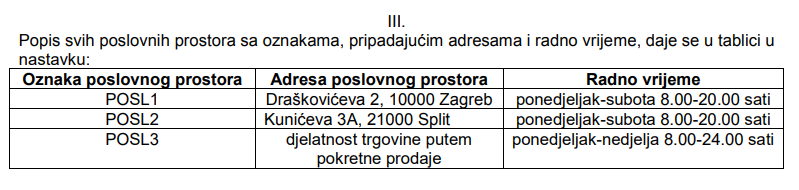
Besides the premise code every register (POS device) has its own POS device code, usually the ordinal number 1, 2, 3. The invoice number is made of the sequence number, the premise code and the device code, for example 1/POSL1/1 or, with a dash as separator, 1-POSL1-1.
What the internal act is and why you need it
The internal act is a decision issued by the trade owner or the responsible person of the company, recording:
- the list of business premises with code, address and working hours
- the POS device codes in each premise
- the operators on the POS devices (employees who issue invoices) with their tax IDs
- the invoice numbering rule: whether invoices are numbered at business unit level or each POS device has its own sequence, and what the invoice number looks like
The act is not sent to the Tax Administration, but you must have it signed, keep it at the premises and show it to an inspection on request. A new one is issued whenever premises, devices, operators or the numbering rule change.
Kigo assembles the internal act for you
Everything the act contains Kigo already knows from the settings and the employee list, so you do not have to write it yourself. The order:
- Check and complete the settings. In Options → System settings → General settings, tab Profit center / Fiscal. 1.0: Business unit short code is already set (just check it), enter the address and working hours of the premise, Invoice sequence at level P-business unit or N-POS device (at business unit level or at POS device level) and Document sequence format (slash or dash in the invoice number). On the General information tab: POS device number. With several business units do the same in each.
- Enter the employees who will issue invoices, with tax ID and status active: Options → Company → Employees. They go into the act as operators on the POS devices.
- Open the Internal act page: in Options → System settings → General settings, tab Profit center / Fiscal. 1.0, click the button Create internal act, or right away: Create internal act. The page shows everything that goes into the act, with all active business units and an invoice number example for each; if something is missing, fix it in the settings or on the employees and come back.
- Enter the decision details: name of the person issuing it, position (director, trade owner), place, date of issue and the date from which it applies. The legal basis is prefilled; align it with your accountant if needed.
- Click Create internal act. The decision with sections I to VI opens, ready to print; the Print button sends it to the printer or to PDF. Sign it and keep it at the premises.
Business premise registration on ePorezna
Every business premise is registered on ePorezna (Fiskalizacija, Prijava poslovnih prostora) before the first invoice from that premise, with the same code, address and working hours you entered in the internal act and in Kigo. You or your accountant do this; Kigo does not send it for you.
With the registration the Tax Administration also asks for details of the producer and maintainer of the software you issue invoices with. Download the Fiscalization data registration form (Word, Croatian): the software details are already filled in, you complete the section Podatci o obvezniku fiskalizacije (tax ID, name, address, premise code and address, premise type, activity, working hours, opening date, status).
For fiscalization you also need a FINA certificate uploaded to Kigo; the whole path from registration to the first fiscalized invoice is described in How to Get Started?, step Fiscalization 1.0.
Common mistakes
- The code in Kigo is not the same as the code registered on ePorezna, or one code is used for two premises.
- A space, diacritic or special character in the code.
- Separator and invoice sequence not decided before the first document; once the first document is issued they cannot be changed.
- No internal act, or one not renewed after a change of premises, devices or employees.
- An invoice issued from a premise not yet registered on ePorezna.
Templates for writing it by hand
If you still want to write the act yourself: Word template (Croatian) or the Tax Administration sample (PDF, Croatian). The content must match what is entered in Kigo and registered on ePorezna.
Guide: How to get started
This article is step 2 of 10 of the getting started guide. Previous step: How to Get Started?. Next step: General settings. All steps: How to Get Started?.